Technical Questions
Prodigy API
We often get requested to link other systems with Prodigy to make the user experience better.
Single Sign On
Many services choose to use our Single Sign On (SSO) option to access Prodigy. Many organizations use SSO solutions provided by third-party vendors, which integrate with their existing systems and applications.
You can connect a SAML 2.0 identity provider yourself, see the step-by-step guides for Google Workspace, Okta, Microsoft Entra ID, or other SAML 2.0 providers.
If you have an existing system you use for authentication that isn't covered above, let us know and we can work with them to allow SSO.
Prodigy API
Prodigy offers a public API that allows you to use your organization's Prodigy data in other systems. Full reference documentation, including authentication details and available endpoints, is available at public-api.prodigyems.com/docs/api.
Generating an API Access Token
Every API request is authenticated with an access token tied to your organization. Admins can generate a token from Settings by choosing API Tokens under the Integrations section, then clicking Generate access token.
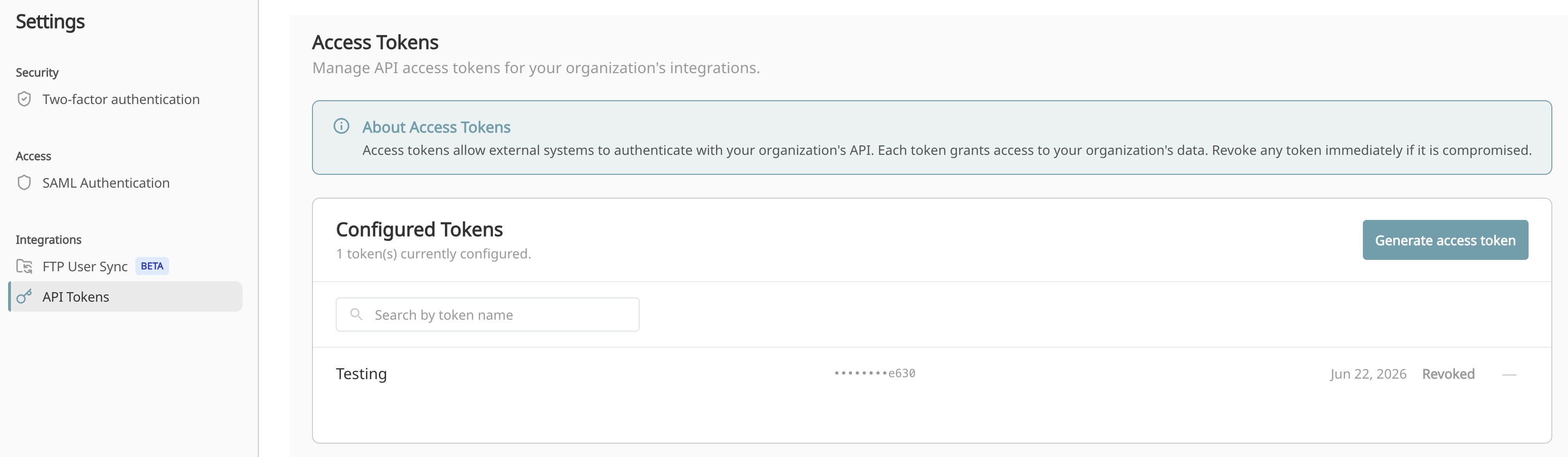
The Configured Tokens list shows every token created for your organization, along with the last few characters of each token, when it was created, and its current status. You can search the list by token name, which is helpful once you have tokens for multiple integrations.
Keep Tokens Secure
Each token grants access to your organization's data. Treat tokens like passwords, and revoke any token immediately if it is compromised or no longer needed.
Automated User Provisioning
If you want your HR system to manage Prodigy accounts automatically, creating new hires, updating departments, and deactivating terminated employees, see the SFTP User Sync guide.
Other Integrations
If you have other systems you are looking to integrate with Prodigy, reach out to support@prodigyems.com and we can discuss the options.